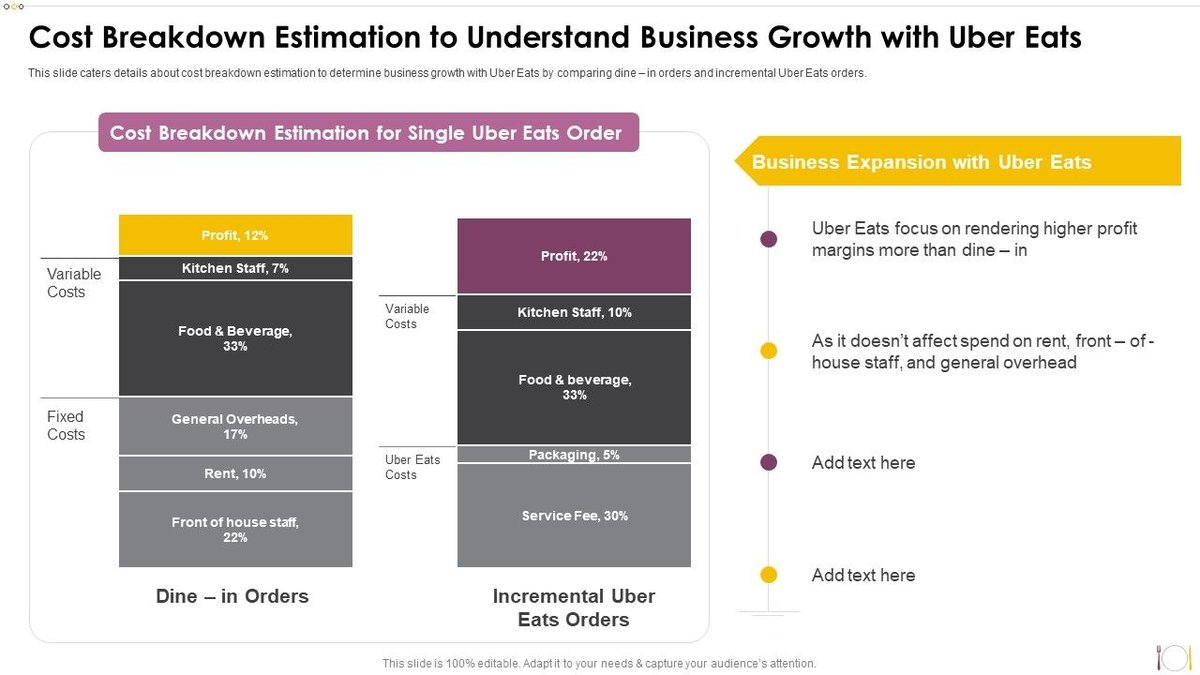
Ever stared at your Uber Eats receipt, wondering how a $20 meal morphed into a $35 charge? You’re not alone. The Uber Eats Cost Breakdown & Fees can feel like a labyrinth of charges, turning the simple act of ordering food into a complex financial puzzle. But it doesn't have to be that way.
As a seasoned observer of the gig economy and a champion for consumer clarity, I’m here to demystify every line item. We'll unpack the standard fees, the situational add-ons, and those often-overlooked costs that collectively dictate your final bill. By the end of this guide, you’ll not only understand where your money is going but also how to navigate the system to save a few dollars.
At a Glance: Your Uber Eats Order in a Nutshell
- Base Food Price: What the restaurant charges, often marked up by 10-30% compared to in-store menus.
- Delivery Fee: Varies by distance, demand, and restaurant; typically under $5.
- Service Fee: Percentage-based (15-30% of subtotal, min $1) for Uber's platform operations.
- Local Operating Fee: Regulatory compliance cost, often city-specific.
- Add-On Fees: Can include busy fees, small order fees, long-range fees, and more.
- Taxes: Standard sales taxes apply.
- Optional Tip: Your direct payment to the driver (typically 10-20%).
- Subscription (Uber One): Can significantly reduce delivery and service fees.
Beyond the Menu Price: The Real Cost of Convenience
Before we even dive into Uber Eats’ specific fees, there’s a crucial initial cost you might not even realize you’re paying: the food itself. Many restaurants, grappling with the commission fees (often 15-30%) Uber Eats charges them, discreetly mark up their menu prices on the app. This means the sushi roll you love might be 10% to 30% more expensive on Uber Eats than if you ordered it directly from the restaurant or picked it up yourself.
So, the "base price" you see for your meal is already a step up from the in-restaurant cost. Factor this in as you build your order, and understand that you're paying a premium for the sheer convenience before any delivery charges even kick in.
Understanding the Core Charges on Your Uber Eats Bill
These are the fees you’ll almost always encounter, laying the foundation for your total bill.
The Delivery Fee: Who Gets It, How It Varies
This is perhaps the most straightforward charge, designed to compensate your courier for bringing your food from the restaurant to your door.
- What it covers: Primarily the driver’s time and effort for the specific delivery.
- How it’s calculated: It’s dynamic, meaning it can fluctuate based on:
- Distance: How far the restaurant is from you.
- Merchant: Some restaurants have lower or higher delivery fees.
- Location: Urban areas might see different rates than suburban ones.
- Demand: During peak hours or bad weather, the fee can increase.
- Courier Availability: Fewer drivers mean higher potential fees.
- Typical Range: Often under $5, but can be higher in specific situations.
- Pro Tip: You can often bypass "priority delivery" fees (an extra $2.99 for faster service) by scheduling your order for a slightly later time or during off-peak hours. This simple hack can often knock a few dollars off your bill.
The Service Fee: Uber's Cut for the Marketplace
This fee is where Uber Eats covers its operational costs, and it's a significant chunk of your bill. Unlike the delivery fee, which goes mainly to the driver, the service fee funds the platform itself.
- What it covers: Think payment processing, customer support, app development, marketing, and the general administration of the Uber Eats marketplace.
- How it’s calculated: It’s typically a percentage of your order subtotal, ranging from 15% to 30%, with a common minimum of $1.
- Important Nuance: While a portion (around $0.10) directly supports Uber's marketplace services, some of the remainder might indirectly benefit couriers who pay a portion back to Uber for "lead generation, payment processing, and support." It's a complex ecosystem.
- Exemption: If the restaurant uses its own staff for delivery, this service fee usually doesn't apply, as Uber's role is purely connecting you to the restaurant, not facilitating the delivery itself.
Local Operating Fees: Responding to Regulations
In some cities or regions, local governments have implemented regulations specifically targeting third-party food delivery platforms. These might include minimum wage requirements for couriers, caps on commission fees charged to restaurants, or other operational mandates.
- What it covers: This fee helps Uber Eats offset the increased costs associated with complying with these local laws.
- Who benefits: Couriers in these areas also receive payments in accordance with local regulations, meaning this fee indirectly supports fairer compensation for drivers.
- Transparency: You'll see this itemized at checkout if it applies to your location.
Other Small Charges: Bags and Beyond
Sometimes, you'll spot minor charges that seem almost negligible but add up. These are typically driven by local laws or merchant policies.
- Examples: Charges for single-use bags (mandated in many cities to reduce waste) or other small regulatory fees imposed by the merchant or local government.
- Bottom Line: Always check the itemized breakdown; these small charges reflect specific requirements or services.
Unpacking Situational & Add-On Fees
These fees don't appear on every order. They pop up depending on your choices, the time of day, or the specific circumstances of your delivery. Knowing about them gives you more control.
The Long-Range Fee: When Your Craving Takes You Far
Sometimes, that specific restaurant with the perfect dish is just a bit too far for a standard delivery. That’s when the Long-Range Fee kicks in.
- When it applies: Applied when you order from a merchant located beyond a certain radius from your delivery address.
- Why it exists: To compensate the courier for the extra travel time, fuel, and effort required for longer journeys.
- How to avoid: Stick to restaurants closer to your location if you want to keep costs down.
Small Order Fees: The Cost of a Tiny Treat
Decided you only want a single cookie or a small coffee? Be prepared for a Small Order Fee.
- When it applies: This charge is levied when your order subtotal falls below a specific threshold, which varies by city and market.
- Why it exists: To ensure that the delivery is economically viable for both the driver and the platform, as smaller orders often don't generate enough revenue to cover operational costs otherwise.
- How to avoid: Simple – add a few more items to your cart until your subtotal exceeds the specified minimum. Consider adding a drink, an extra side, or even something for tomorrow's lunch to bypass this fee.
Delivery Adjustment Fees: When Plans Change
Life happens, and sometimes you need to update your delivery address after placing an order. While Uber Eats often allows this, it might come with a cost.
- When it applies: If you change your delivery address post-placement, especially if the new address is significantly different from the original.
- Why it exists: To compensate the courier for the additional time, mileage, and effort required due to your updated request. Drivers commit to a route, and changes impact their efficiency and earnings.
Marketplace Fee: When the Restaurant Delivers Itself
Not all deliveries on Uber Eats are handled by independent Uber Eats couriers. Some restaurants use their own staff or a third-party service they've contracted.
- When it applies: This fee is charged when the merchant is responsible for delivering your order directly.
- What it covers: It contributes to operating the Uber platform that connected you to the restaurant in the first place, facilitating the order and payment processing.
- How it's calculated: Can be a flat amount or a percentage of the order subtotal, often with minimum and maximum caps.
The Busy Fee: Peak Demand, Peak Prices
Ever noticed prices jump during dinner rush or on a rainy Saturday night? That’s the Busy Fee (also known as "Surge Pricing").
- When it applies: This dynamic pricing charge activates when demand for deliveries significantly outweighs the available supply of drivers.
- Why it exists: It incentivizes more drivers to get on the road during high-demand periods, ensuring that orders can still be fulfilled, albeit at a higher cost.
- How to avoid: If possible, schedule your orders in advance during off-peak hours or simply wait until demand subsides. A little patience can save you money here.
Fees for Changed Orders & Cancellations: When Things Go Sideways
Modifying or canceling an order isn't always free, especially if the process has already begun.
- When it applies: If you cancel an order after a certain time limit, or if the driver has already picked up the food or commenced delivery.
- Why it exists: To compensate drivers for their time and effort already expended, and to cover costs for the restaurant that may have already prepared the food.
- Consideration: Be sure of your order before confirming, as last-minute changes can incur penalties.
The Unavoidable & the Optional: Taxes, Tips, and Subscriptions
Beyond the service and delivery logistics, these elements round out your final bill, covering legal obligations and personal generosity.
Taxes: Your Local Contribution
Just like any other purchase, your Uber Eats order is subject to regional and local taxes.
- What it includes: Standard sales tax, and potentially other local surcharges or levies depending on your municipality.
- Transparency: These taxes are always itemized at checkout.
- Heads Up: The initial estimate might slightly differ from the final amount, as tax calculations can be complex and sometimes adjusted based on the specific combination of items and fees.
Tipping Your Driver: The Independent Contractor
While optional, tipping your delivery driver is a widely accepted practice and a crucial part of their earnings.
- Who they are: Uber Eats drivers are independent contractors, meaning they rely heavily on tips to supplement their base earnings from delivery fees.
- Typical amount: Most customers tip between 10% and 20% of the order total, reflecting good service.
- Why it matters: It directly impacts the driver's take-home pay and incentivizes them to provide excellent service. Think of it as directly rewarding the person who brings your food right to your door.
Uber One (Formerly Uber Eats Pass): Is Membership Worth It?
For frequent users, a subscription service can transform your Uber Eats experience and significantly reduce your overall costs.
- Cost: Uber One typically costs $9.99 per month.
- Benefits:
- Free Delivery: On eligible orders from marked restaurants, usually for orders over $15.
- Percentage Off: Often 5% off eligible orders.
- Other Perks: Can include discounts on Uber rides, priority customer service, and exclusive offers.
- Worth it? If you order more than once or twice a month, the savings on delivery and service fees can easily outweigh the monthly subscription cost. It's definitely worth doing the math based on your ordering habits. To get a broader perspective on whether such services truly deliver value, you might want to consider Should you use Uber Eats? for a deeper dive into the overall pros and cons of the platform.
Putting It All Together: A Real-World Order Breakdown
Let's walk through an example to see how all these fees can stack up and affect your final cost.
Imagine you're craving some pad thai and your food subtotal comes to $14.25. Here's a hypothetical breakdown based on typical fees:
- Food Subtotal: $14.25
- Delivery Fee: $0.99 (a relatively low one, perhaps from a nearby restaurant)
- Service Fee: $2.28 (16% of $14.25)
- Taxes: $1.68 (a combined sales tax and local surcharge)
- Subtotal Before Tip/Add-ons: $19.20
Now, let's consider some common additions: - Optional Priority Delivery Fee: +$1.49 (if you chose to speed things up)
- Optional Tip (20% of food subtotal): +$4.00 (20% of $14.25 rounded)
- Final Total: $23.20 (without priority delivery) or $24.69 (with priority delivery)
As you can see, the base cost of your food ($14.25) can nearly double once all the fees, taxes, and a reasonable tip are added. This example clearly illustrates how quickly the convenience factor translates into a higher price tag.
Smart Strategies to Save Money on Uber Eats
Understanding the fees is the first step; actively trying to reduce them is the next. Here’s how to be a savvier Uber Eats user:
Filter Restaurants by Price to Find More Affordable Options
It sounds obvious, but many users overlook this simple filter. When browsing, look for options to sort or filter restaurants by price range. This can quickly narrow down your choices to eateries that are generally more budget-friendly, both in their base menu prices and potentially their associated delivery fees.
Utilize Special Offers, Rewards, and Discount Coupons
Uber Eats frequently runs promotions. Don't just browse the main page; actively seek out deals:
- "Deals" Category: Always check the dedicated "Deals" or "Promotions" section in the app. You'll often find discounts like "buy one get one free," percentage off your order, or reduced delivery fees from specific restaurants.
- Email & Notifications: Opt-in for Uber Eats emails and push notifications. They often announce limited-time offers and personalized discounts.
- Promo Codes: Keep an eye out for promo codes from partners or influencers.
Sign Up for Uber One (or its equivalent)
As discussed, if you order with any regularity, an Uber One subscription is a game-changer. The monthly fee (around $9.99) can be quickly offset by the savings on delivery and service fees, especially if you meet the minimum order requirements for free delivery.
Schedule Orders in Advance to Avoid "Busy Fees"
If your hunger isn't immediate, planning ahead can save you money.
- Avoid Peak Times: Scheduling your order for off-peak hours (e.g., late afternoon before dinner rush, or mid-morning) can help you avoid the dynamic "Busy Fees" that kick in when demand is high.
- Bypass Priority Delivery: Scheduling also often eliminates the option (and temptation) for "Priority Delivery" fees, saving you a couple of dollars.
Pay with a Rewards Credit Card
This is less about reducing Uber Eats fees directly and more about maximizing your personal financial return. Many credit cards offer bonus points or cashback on dining and food delivery purchases.
- Check Card Benefits: Review your credit card benefits to see if any of your cards offer accelerated rewards for these types of transactions. A card offering 3-5% cashback on dining can add up over time.
Contact Uber Eats Customer Support to Dispute Unfair Fees
If you genuinely believe a fee was applied in error or that your experience warrants a refund (e.g., extremely late delivery, incorrect order, or an inexplicable charge), don't hesitate to reach out to customer support.
- Be Polite & Clear: Clearly explain the situation.
- Be Realistic: While they can't waive legitimate fees for convenience, they often have discretion for service issues or clear billing errors. Lobbying for a refund can sometimes pay off.
Final Word: Navigating the Delivery Economy with Confidence
Uber Eats, like other food delivery platforms, offers undeniable convenience. But that convenience comes at a cost, often hidden beneath layers of dynamic pricing and service charges. By understanding the Uber Eats Cost Breakdown & Fees, you transform from a passive consumer into an informed one.
You now have the knowledge to decipher your bill, anticipate potential charges, and apply smart strategies to save money. Whether it’s signing up for a subscription, scheduling strategically, or simply choosing a closer restaurant, you have the tools to make Uber Eats work better for your budget. So go ahead, order that craving – but do so with your eyes wide open, empowered by a clear understanding of exactly what you’re paying for.